Install a component
The Design studio makes it easy to save component variants to build a reusable library of design options for future use. This feature is especially useful for teams working on multi-site deployments or needing to maintain brand coherence while supporting flexible design needs.
To make components and their variants available in Page builder, newly generated components in draft state must be activated, and newly generated variants of existig active components must be saved. Then the component or variant code needs to be copied to your repository. This ensures it becomes part of the shared design system and is accessible for deployment.
To add your code to your repository manually:
-
Open the component or variant in Code mode.
-
Click Copy .
-
Open your repository and paste the code of the variant.
-
In Portal, redeploy the project.
To add your code to your repository with the Sitecore CLI:
-
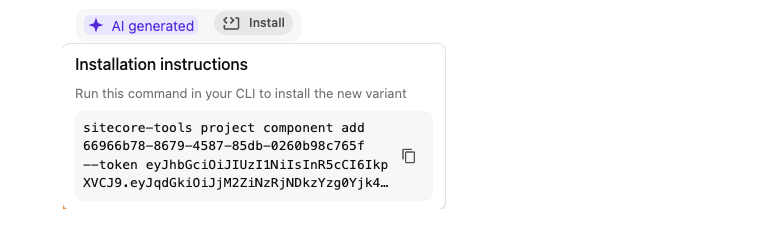
Click Install.
-
Copy the CLI command.
-
Open the Sitecore CLI, paste the command and run it to install the variant in the repository.
-
In Portal, redeploy the project.
Once deployed, the updated component becomes available in the Design studio for preview and testing.