Set a limit for an event or session rule
Feature availability is part of a phased rollout. Your organization may not see this functionality yet. It will become available when your environment is included in the rollout.
For event and session rules, you can set a limit to specify how many events or sessions must meet the rule conditions for a profile to be included in the audience. If you don't set a limit, no count condition is applied.
The limit works differently depending on the type of rule:
- For an event rule, the limit specifies how many events must meet the event conditions. You can also choose whether the events are counted within a single session or across all sessions.
- For a session rule, the limit specifies how many sessions must meet the session conditions.
To set a limit for an event or session rule:
-
In the navigation menu, click Performance.
-
In the left-hand pane, select Audiences.
-
On the Audiences page, open the audience you want to edit.
-
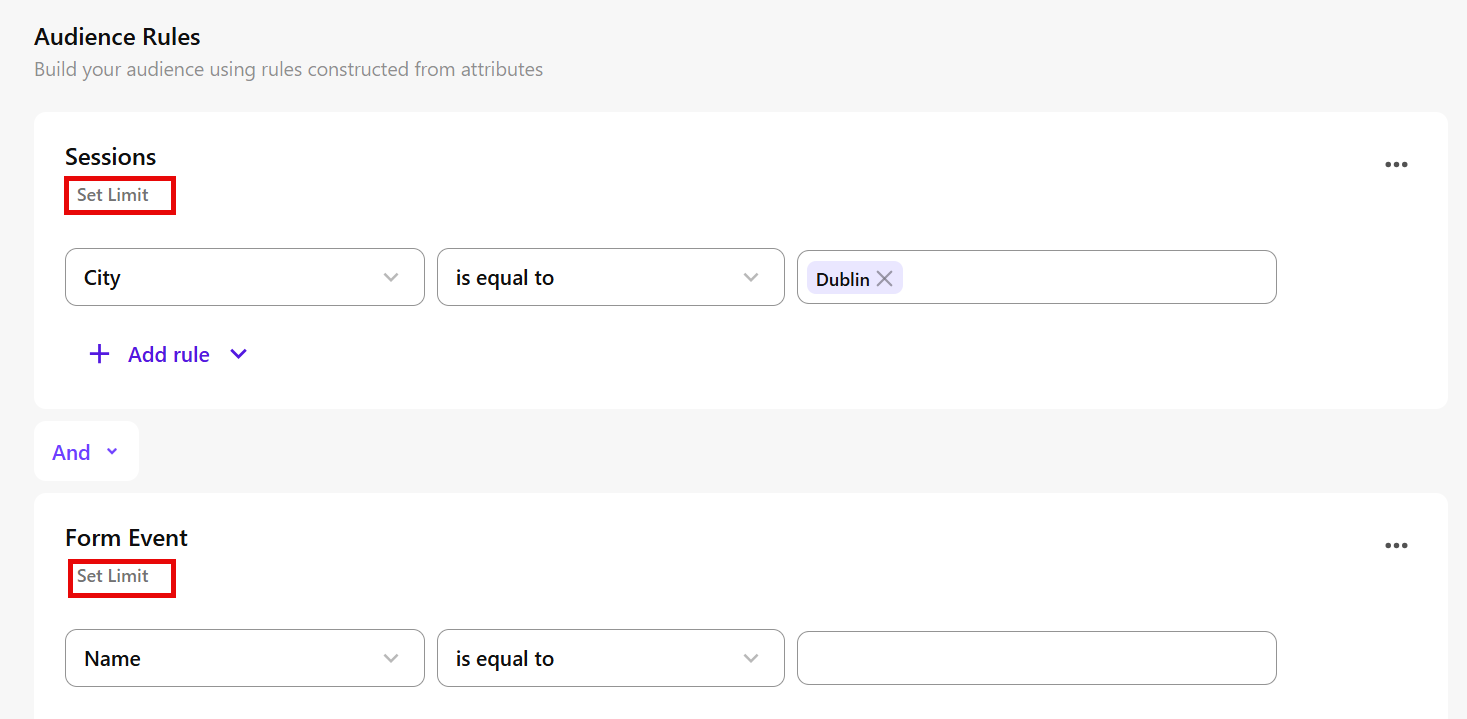
In Audience builder, in the Audience Rules workspace, find the event or session rule you want to set a limit for.
-
Click Set Limit.
-
Select a number comparator, such as is equal to, is greater than, or is between.
-
Enter the number of events or sessions required.
-
For an event rule, select how the events are counted:
- Within a single session - the required number of events must occur in the same session.
- Across all sessions - the events are counted across all sessions for the profile.
-
Click to apply the limit to the rule.
Examples
Event rule
Suppose the rule targets page view events that meet a specific page condition.
- Is equal to 3 within a single session - one session must contain exactly three matching page view events.
- Is equal to 3 across all sessions - the profile must have exactly three matching page view events in total. For example, one event can occur in one session and two events in another.
Session rule
Suppose the rule is City is equal to Dublin.
- Is equal to 2 - the profile must have exactly two sessions where the city is Dublin.