Set an audience refresh schedule
Feature availability is part of a phased rollout. Your organization may not see this functionality yet. It will become available when your environment is included in the rollout.
Use an audience refresh schedule to control how often an individual audience is automatically refreshed. This helps keep audience membership up to date before campaigns, personalization, or other audience-based activities that depend on current audience data.
You can set a refresh interval for each audience, such as every 6, 8, 12, or 24 hours. The schedule controls when the audience refresh runs, but it does not change how audience membership is calculated.
If no refresh schedule is set, the audience uses the default schedule of every 6 hours.
To set an audience refresh schedule:
-
In the navigation menu, click Optimization.
-
In the left sidebar, select Audiences.
-
On the Audiences page, open the audience whose refresh schedule you want to change.
-
In the upper-right corner, click Change schedule.
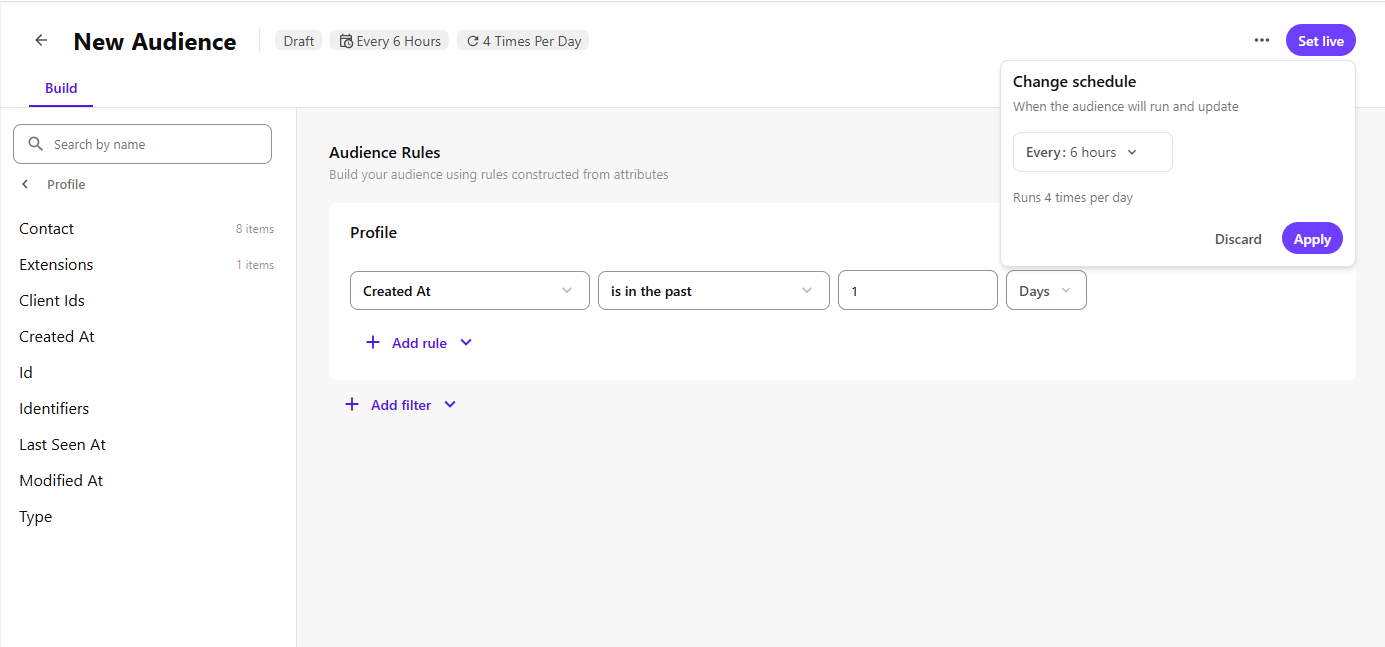
-
Select one of the following refresh intervals: The selected interval determines how often the audience refresh job runs. For example, Every 6 hours refreshes the audience four times a day, Every 8 hours refreshes it three times a day, and so on.
- Every 6 hours
- Every 8 hours
- Every 12 hours
- Every 24 hours
-
If you selected Every 24 hours, select the specific time when the audience should refresh.
-
Click Apply.
After you apply the schedule, the audience is refreshed automatically based on the selected schedule.