Audience rule comparators
Feature availability is part of a phased rollout. Your organization may not see this functionality yet. It will become available when your environment is included in the rollout.
When you create or edit an audience, you select a comparator for each audience rule. A comparator defines how the selected attribute value is matched.
For example, if you select the Email attribute, you can use the contains comparator to match profiles whose email address includes a specific domain.
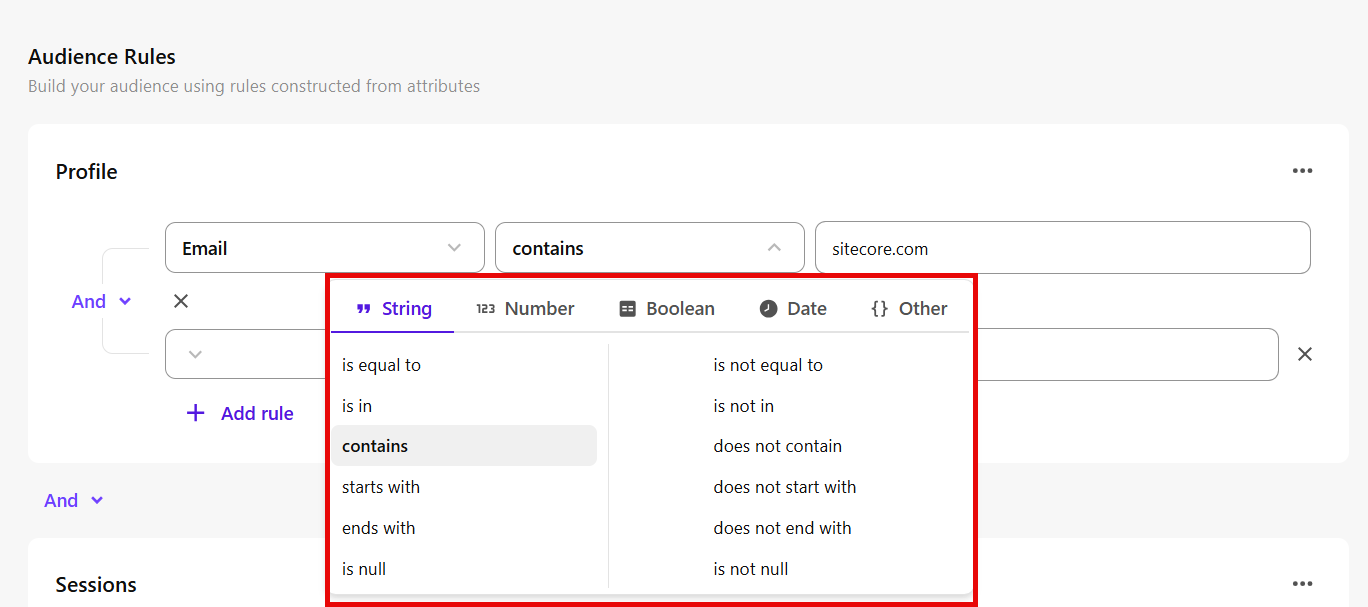
The available comparators depend on the selected attribute and are grouped by value type: String, Number, Boolean, Date, and Other.
String comparators
Use string comparators to match text values.
| Comparator | Description |
|---|---|
| is equal to | Matches the exact text value. |
| is not equal to | Excludes the exact text value. |
| is in | Matches any value in a list of text values. |
| is not in | Excludes values in a list of text values. |
| contains | Matches text that includes the specified value. |
| does not contain | Excludes text that includes the specified value. |
| starts with | Matches text that begins with the specified value. |
| does not start with | Excludes text that begins with the specified value. |
| ends with | Matches text that ends with the specified value. |
| does not end with | Excludes text that ends with the specified value. |
| is null | Matches when no value exists. |
| is not null | Matches when a value exists. |
Number comparators
Use number comparators to match numeric values.
| Comparator | Description |
|---|---|
| is equal to | Matches the specified number. |
| is not equal to | Excludes the specified number. |
| is greater than | Matches values greater than the specified number. |
| is greater than or equal to | Matches values greater than or equal to the specified number. |
| is less than | Matches values less than the specified number. |
| is less than or equal to | Matches values less than or equal to the specified number. |
| is between | Matches values within a range. |
| is not in between | Matches values outside a range. |
| is null | Matches when no value exists. |
| is not null | Matches when a value exists. |
Boolean comparators
Use Boolean comparators to match true or false values.
| Comparator | Description |
|---|---|
| is true | Matches when the value is true. |
| is false | Matches when the value is false. |
| is null | Matches when no value exists. |
| is not null | Matches when a value exists. |
Date comparators
Use date comparators to match time-based attribute values.
Date comparisons use UTC, not your organization’s local timezone. This can affect results near day boundaries.
| Comparator | Description |
|---|---|
| is in the past | Matches dates within a specified past time period. |
| is not in the past | Excludes dates within a specified past time period. |
| is in the next | Matches dates within a specified future time period. |
| is not in the next | Excludes dates within a specified future time period. |
| is now plus | Matches dates after the current date by a specified amount of time. |
| is now minus | Matches dates before the current date by a specified amount of time. |
| is on the day | Matches the specified date. |
| is not on the day | Excludes the specified date. |
| is between | Matches dates within a specified range. |
| is not in between | Matches dates outside a specified range. |
| is before | Matches dates earlier than the specified date. |
| is after | Matches dates later than the specified date. |
| is in the year | Matches dates in the specified year. |
| is not in the year | Excludes dates in the specified year. |
Other comparators
Use these comparators to match supported attribute values that do not fit the categories above.
| Comparator | Description |
|---|---|
| contains | Matches when the attribute value contains the specified value. |
| does not contain | Excludes attribute values that contain the specified value. |
| is null | Matches when no value exists. |
| is not null | Matches when a value exists. |