Audience rule comparators
When you create or edit an audience, you select a comparator for each audience rule. A comparator defines how the selected attribute value is matched.
For example, if you select the Email attribute, you can use the contains comparator to match profiles whose email address includes a specific domain.
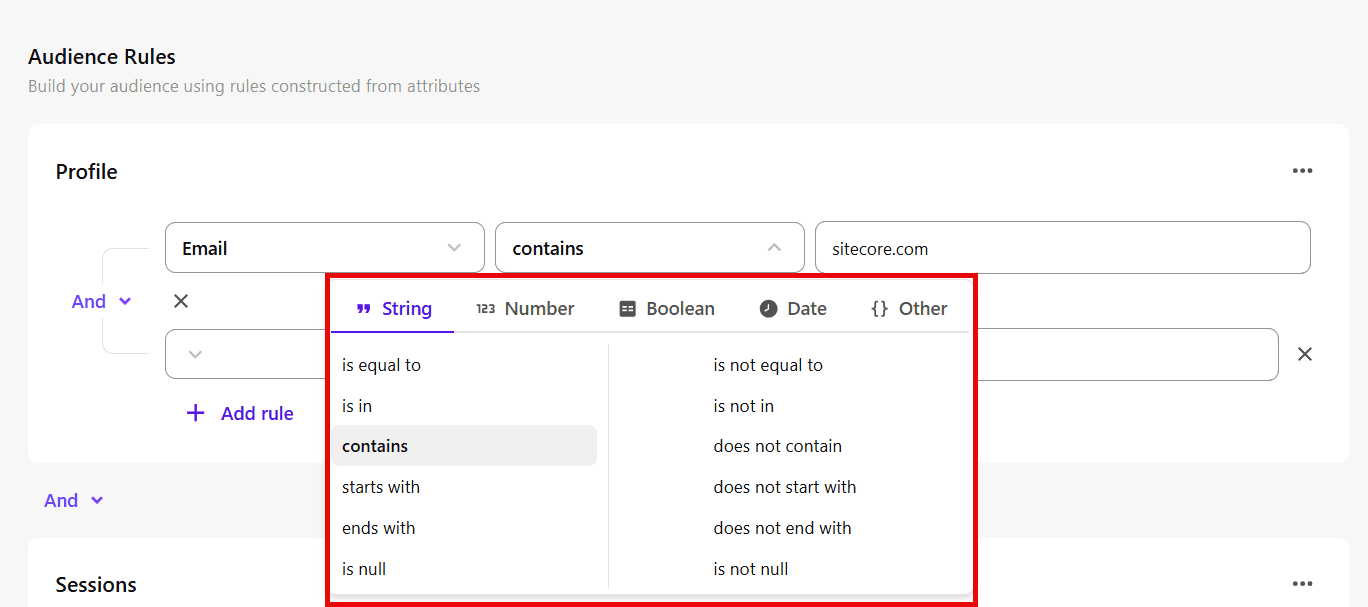
The available comparators depend on the selected attribute and are grouped by value type: String, Number, Boolean, Date, and Other.
String comparators
Use string comparators to match text values.
|
Comparator |
Description |
|---|---|
|
is equal to |
Matches the exact text value. |
|
is not equal to |
Excludes the exact text value. |
|
is in |
Matches any value in a list of text values. |
|
is not in |
Excludes values in a list of text values. |
|
contains |
Matches text that includes the specified value. |
|
does not contain |
Excludes text that includes the specified value. |
|
starts with |
Matches text that begins with the specified value. |
|
does not start with |
Excludes text that begins with the specified value. |
|
ends with |
Matches text that ends with the specified value. |
|
does not end with |
Excludes text that ends with the specified value. |
|
is null |
Matches when no value exists. |
|
is not null |
Matches when a value exists. |
Number comparators
Use number comparators to match numeric values.
|
Comparator |
Description |
|---|---|
|
is equal to |
Matches the specified number. |
|
is not equal to |
Excludes the specified number. |
|
is greater than |
Matches values greater than the specified number. |
|
is greater than or equal to |
Matches values greater than or equal to the specified number. |
|
is less than |
Matches values less than the specified number. |
|
is less than or equal to |
Matches values less than or equal to the specified number. |
|
is between |
Matches values within a range. |
|
is not in between |
Matches values outside a range. |
|
is null |
Matches when no value exists. |
|
is not null |
Matches when a value exists. |
Boolean comparators
Use Boolean comparators to match true or false values.
|
Comparator |
Description |
|---|---|
|
is true |
Matches when the value is true. |
|
is false |
Matches when the value is false. |
|
is null |
Matches when no value exists. |
|
is not null |
Matches when a value exists. |
Date comparators
Use date comparators to match time-based attribute values.
Date comparisons use UTC, not your organization’s local timezone. This can affect results near day boundaries.
|
Comparator |
Description |
|---|---|
|
is in the past |
Matches dates within a specified past time period. |
|
is not in the past |
Excludes dates within a specified past time period. |
|
is in the next |
Matches dates within a specified future time period. |
|
is not in the next |
Excludes dates within a specified future time period. |
|
is now plus |
Matches dates after the current date by a specified amount of time. |
|
is now minus |
Matches dates before the current date by a specified amount of time. |
|
is on the day |
Matches the specified date. |
|
is not on the day |
Excludes the specified date. |
|
is between |
Matches dates within a specified range. |
|
is not in between |
Matches dates outside a specified range. |
|
is before |
Matches dates earlier than the specified date. |
|
is after |
Matches dates later than the specified date. |
|
is in the year |
Matches dates in the specified year. |
|
is not in the year |
Excludes dates in the specified year. |
Other comparators
Use these comparators to match supported attribute values that do not fit the categories above.
|
Comparator |
Description |
|---|---|
|
contains |
Matches when the attribute value contains the specified value. |
|
does not contain |
Excludes attribute values that contain the specified value. |
|
is null |
Matches when no value exists. |
|
is not null |
Matches when a value exists. |