1. Audiences

View and inspect audience details

Use View code and Inspect in Audience builder to review how an audience is defined.

These options are useful when you want to check the audience rules, review rule groups, or inspect the full audience configuration.

View the audience code

Use View code to review how the audience rules are represented as generated code and JSON.

To view the audience code:

  1. In the navigation menu, click Performance.

  2. In the left-hand pane, select Audiences.

  3. On the Audiences page, open the audience you want to view.

  4. In Audience builder, at the top-right corner of the page, click the horizontal ellipsis icon , then click View code.

    The Generated code dialog opens.

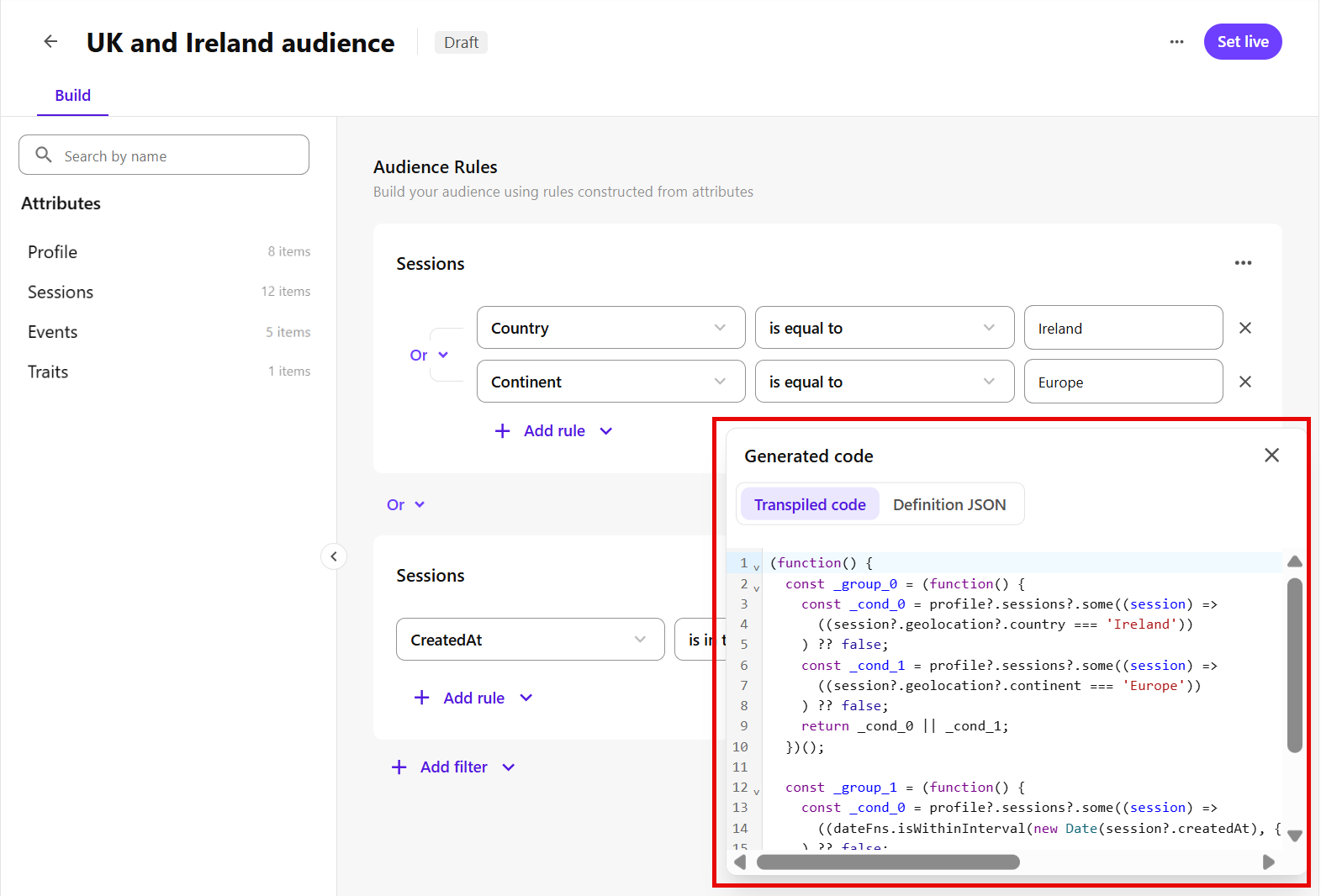
    At the top-right of the page, click the horizontal ellipsis icon, then click View code to open the Generated code dialog
  5. Review the following tabs:

    • Transpiled code - shows the generated logic used by SitecoreAI to process the audience rules.

      For example, in the UK and Ireland audience, the following transpiled code checks whether:

      • the profile has a session where the country is Ireland or the continent is Europe.

      • the profile has a session created within the past 30 days.

      Because the rule groups are joined with Or, the profile belongs to the audience if either rule group matches.

      (function() {
        const _group_0 = (function() {
          const _cond_0 = profile?.sessions?.some((session) =>
            ((session?.geolocation?.country === 'Ireland'))
          ) ?? false;
          const _cond_1 = profile?.sessions?.some((session) =>
            ((session?.geolocation?.continent === 'Europe'))
          ) ?? false;
          return _cond_0 || _cond_1;
        })();
      
        const _group_1 = (function() {
          const _cond_0 = profile?.sessions?.some((session) =>
            ((dateFns.isWithinInterval(new Date(session?.createdAt), { start: dateFns.subDays(new Date(), 30), end: new Date() })))
          ) ?? false;
          return _cond_0;
        })();
      
        return _group_0 || _group_1;
      })();
    • Definition JSON - shows the same audience rule structure in JSON format.

      For example, in the UK and Ireland audience, it shows:

      • a top-level OR operator.

      • one rule group for session location rules.

      • one rule group for sessions created within the past 30 days.

      • the selected session attributes, comparators, and values used in each rule.

      {
        "operator": "OR",
        "groups": [
          {
            "operator": "OR",
            "conditions": [
              {
                "source": "sessions",
                "field": "geolocation/country",
                "operator": "EQUALS",
                "value": "Ireland"
              },
              {
                "source": "sessions",
                "field": "geolocation/continent",
                "operator": "EQUALS",
                "value": "Europe"
              }
            ]
          },
          {
            "operator": "AND",
            "conditions": [
              {
                "source": "sessions",
                "field": "createdAt",
                "operator": "IN_PAST",
                "value": [
                  "30"
                ],
                "unit": "DAYS"
              }
            ]
          }
        ]
      }

Inspect the audience details

Use Inspect to review the full audience configuration in more detail, including metadata, rule definitions, generated logic, and configuration details.

To inspect the audience details:

  1. In the navigation menu, click Performance.

  2. In the left-hand pane, select Audiences.

  3. On the Audiences page, open the audience you want to inspect.

  4. In Audience builder, at the top-right corner of the page, click the horizontal ellipsis icon , then click Inspect.

    The Inspect audience dialog opens.

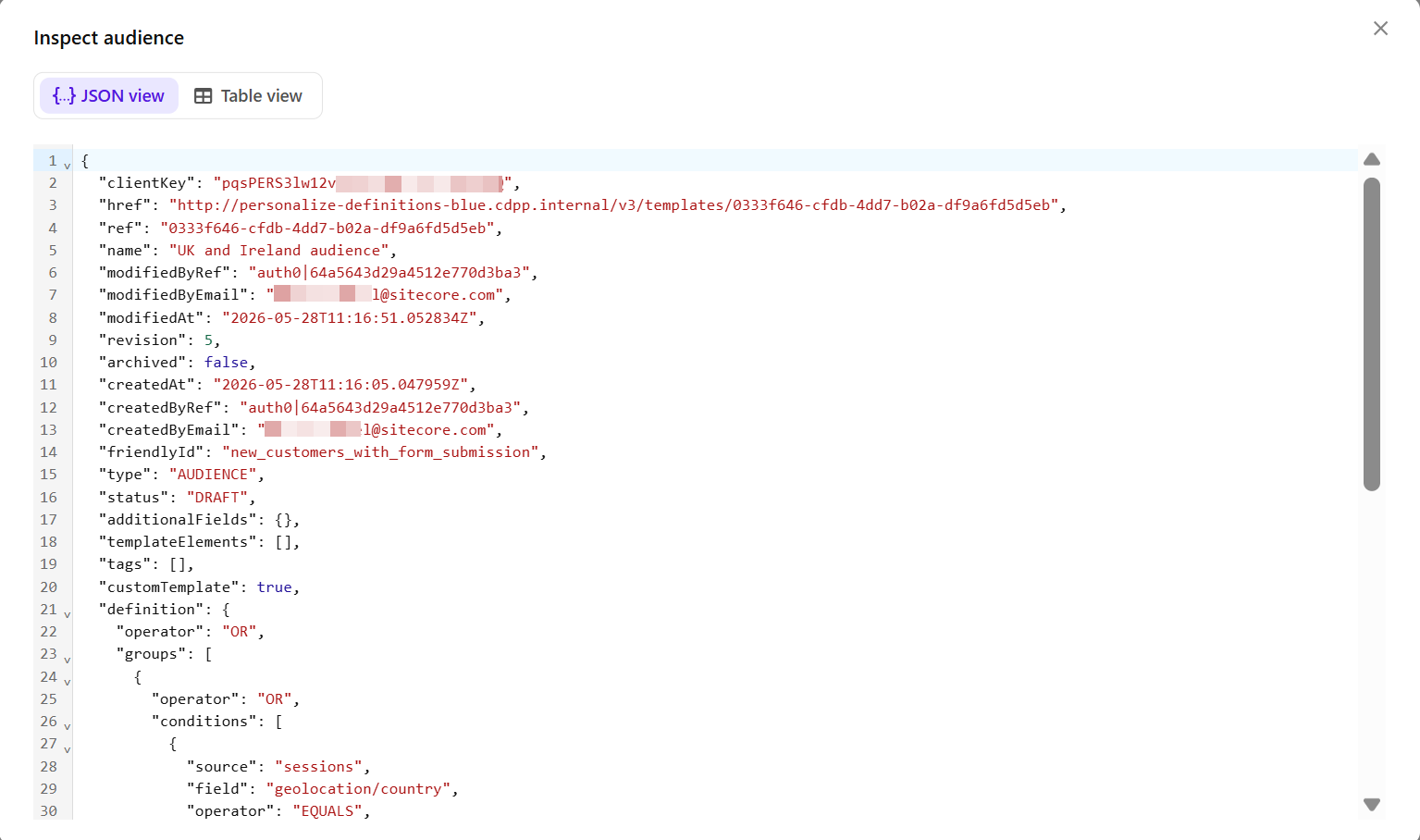
    At the top-right of the page, click the horizontal ellipsis icon, then click Inspect to open the Inspect audience dialog
  5. Review the following views:

    • JSON view - shows the complete audience configuration in JSON format. This view includes technical details such as:

      • audience metadata, such as name, status, revision, created date, and modified date.

      • audience rules and rule groups.

      • attributes, operators, and values used in each rule.

      • generated logic used to process the audience rules.

      This view is useful when you need complete technical details about the audience configuration or when troubleshooting audience setup.

      For example, the following JSON view for the UK and Ireland audience shows:

      • the audience name and status.

      • the top-level OR operator.

      • one rule group for session location rules.

      • one rule group for sessions created within the past 30 days.

      • the generated logic for processing the audience rules.

      {
        "clientKey": "pqsPERS3lw12v5a9rrHPW1c4hET73GxQ",
        "href": "http://personalize-definitions-blue.cdpp.internal/v3/templates/0333f646-cfdb-4dd7-b02a-df9a6fd5d5eb",
        "ref": "0333f646-cfdb-4dd7-b02a-df9a6fd5d5eb",
        "name": "UK and Ireland audience",
        "modifiedByRef": "auth0|64a5643d29a4512e770d3ba3",
        "modifiedByEmail": "[email protected]",
        "modifiedAt": "2026-05-28T11:16:51.052834Z",
        "revision": 5,
        "archived": false,
        "createdAt": "2026-05-28T11:16:05.047959Z",
        "createdByRef": "auth0|64a5643d29a4512e770d3ba3",
        "createdByEmail": "[email protected]",
        "friendlyId": "new_customers_with_form_submission",
        "type": "AUDIENCE",
        "status": "DRAFT",
        "additionalFields": {},
        "templateElements": [],
        "tags": [],
        "customTemplate": true,
        "definition": {
          "operator": "OR",
          "groups": [
            {
              "operator": "OR",
              "conditions": [
                {
                  "source": "sessions",
                  "field": "geolocation/country",
                  "operator": "EQUALS",
                  "value": "Ireland"
                },
                {
                  "source": "sessions",
                  "field": "geolocation/continent",
                  "operator": "EQUALS",
                  "value": "Europe"
                }
              ]
            },
            {
              "operator": "AND",
              "conditions": [
                {
                  "source": "sessions",
                  "field": "createdAt",
                  "operator": "IN_PAST",
                  "value": [
                    "30"
                  ],
                  "unit": "DAYS"
                }
              ]
            }
          ]
        },
        "transpiledDefinition": "(function() {\n  const _group_0 = (function() {\n    const _cond_0 = profile?.sessions?.some((session) =>\n      ((session?.geolocation?.country === 'Ireland'))\n    ) ?? false;\n    const _cond_1 = profile?.sessions?.some((session) =>\n      ((session?.geolocation?.continent === 'Europe'))\n    ) ?? false;\n    return _cond_0 || _cond_1;\n  })();\n\n  const _group_1 = (function() {\n    const _cond_0 = profile?.sessions?.some((session) =>\n      ((dateFns.isWithinInterval(new Date(session?.createdAt), { start: dateFns.subDays(new Date(), 30), end: new Date() })))\n    ) ?? false;\n    return _cond_0;\n  })();\n\n  return _group_0 || _group_1;\n})();"
      }
    • Table view - displays the same audience definition in a more readable format.

      For example, for the UK and Ireland audience, the table view helps you confirm that the audience includes profiles who match either the session location rules or the session created date rule.

If you have suggestions for improving this article, let us know!