Add a task to a campaign
Create a task to track an activity that needs to be completed as part of a campaign. You can add one or more tasks to organize and track work that supports the campaign but isn't associated with a specific deliverable, such as coordinating meetings, following up with stakeholders, or preparing reports.
You can assign each task to a team member, set its priority and due date, and use comments and checklists to coordinate work.
To create a task within a specific deliverable, see Add a task to a deliverable.
Alternatively, you can create a task from the Tasks page in Strategy and select the campaign you want to associate it with. See Create a task for instructions.
To add a task to a campaign:
-
In the navigation menu, click Strategy.
-
In the left sidebar, click Campaigns.
-
On the Campaigns page, click the name of the campaign that you want to add a task to.
-
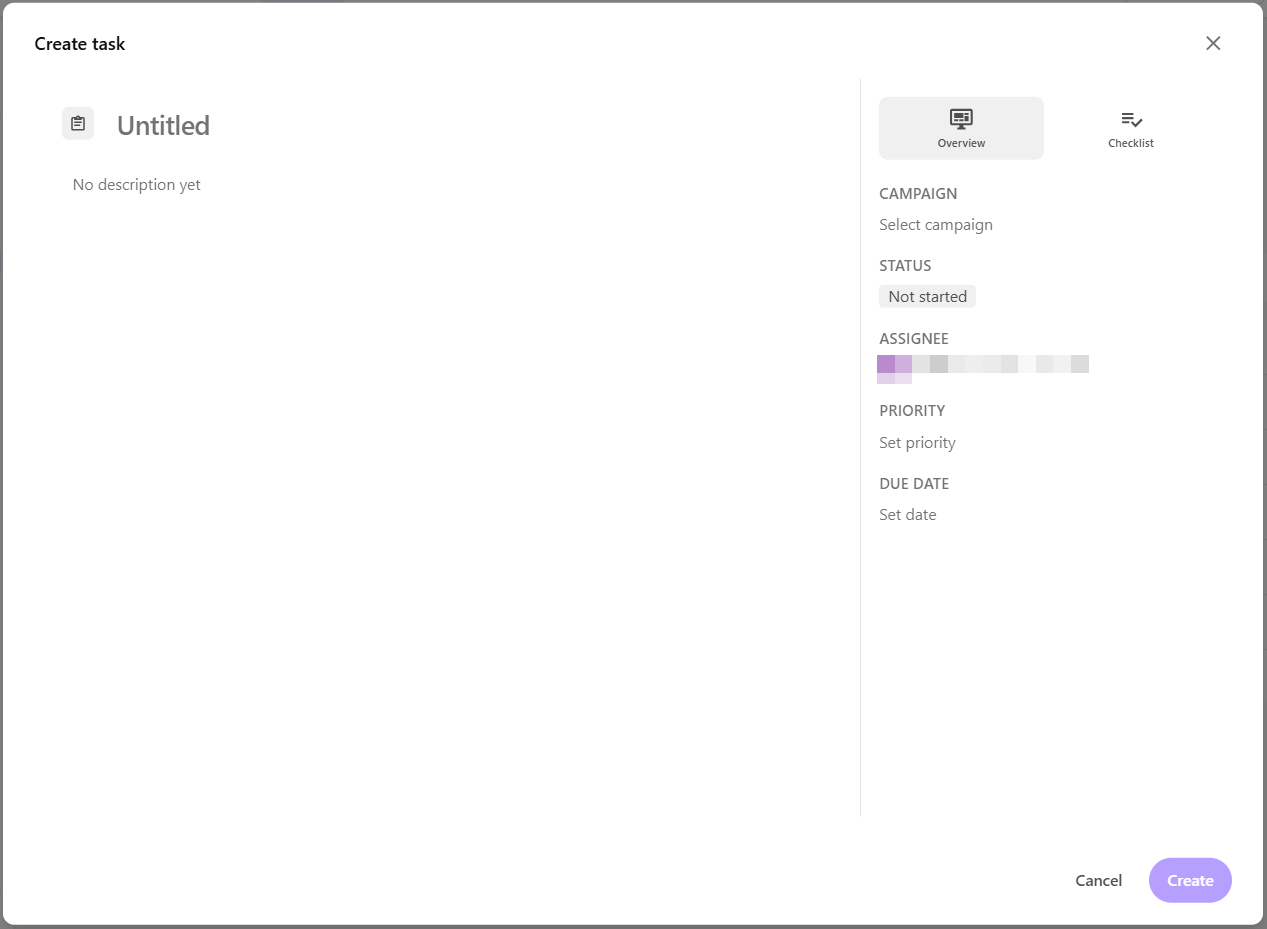
On Plan tab, click Create. The task dialog opens.
-
Enter a task name (up to 255 characters), then press Enter.
-
Optionally, click the field below the task name to add a description.
-
In the right-pane, on the Overview tab, edit the following:
-
Campaign - select a campaign to associate with the task, if needed.
WarningA task's campaign assignment is permanent and cannot be changed. If you don't select a campaign when creating the task, you cannot associate it with a campaign later.
-
Status - select Not started, Backlog, Triage, In progress, In review, Pending feedback, Completed, and Cancelled.
-
Assignee - select the team member responsible for the task.
-
Priority - select Urgent, High, Medium, or Low.
-
Due date - select a date from the calendar.
-
-
Optionally, open the Checklist tab and click Add checklist to track supporting requirements or reviews. See Add a checklist.
Your changes are saved automatically.
- Click Create. The task appears on the Plan tab.
Next steps
After adding a task to a campaign, you can:
- Repeat the steps to add more tasks to the campaign.
- Edit task details to update its status, assignee, priority, or due date.
- Add subtasks to define additional work that must be completed for the task.
- Collaborate on a task by adding comments and tagging team members.
- Add a task checklist to track supporting requirements or reviews.