Using HTTP Request in a workflow
The HTTP Request action lets a workflow agent send data to an external system. For example, you can use an HTTP Request action to send generated content to a webhook, a middleware service, or your own API.
The HTTP Request action is useful when a workflow needs to call an external endpoint after another action has produced content or data.
Configure an HTTP Request action
When you add an HTTP Request action to a workflow, configure these fields:
|
Field |
What it does |
Example |
|---|---|---|
|
HTTP Method |
The request method required by the external API. |
|
|
URL |
The destination endpoint where the request is sent. |
|
|
Headers (JSON) |
Request metadata required by the external API. This often includes the content type and authentication details. |
|
|
Body (JSON) |
The payload sent to the API. This is where you can pass data from previous workflow steps using workflow variables. |
|
Example workflow: Send generated content to an external API
Building on the example that uses the Invoke Tool action, the workflow already finds a page, retrieves its content, and generates a summary.
To send that summary to an external system, add an HTTP Request action after Generate Content.
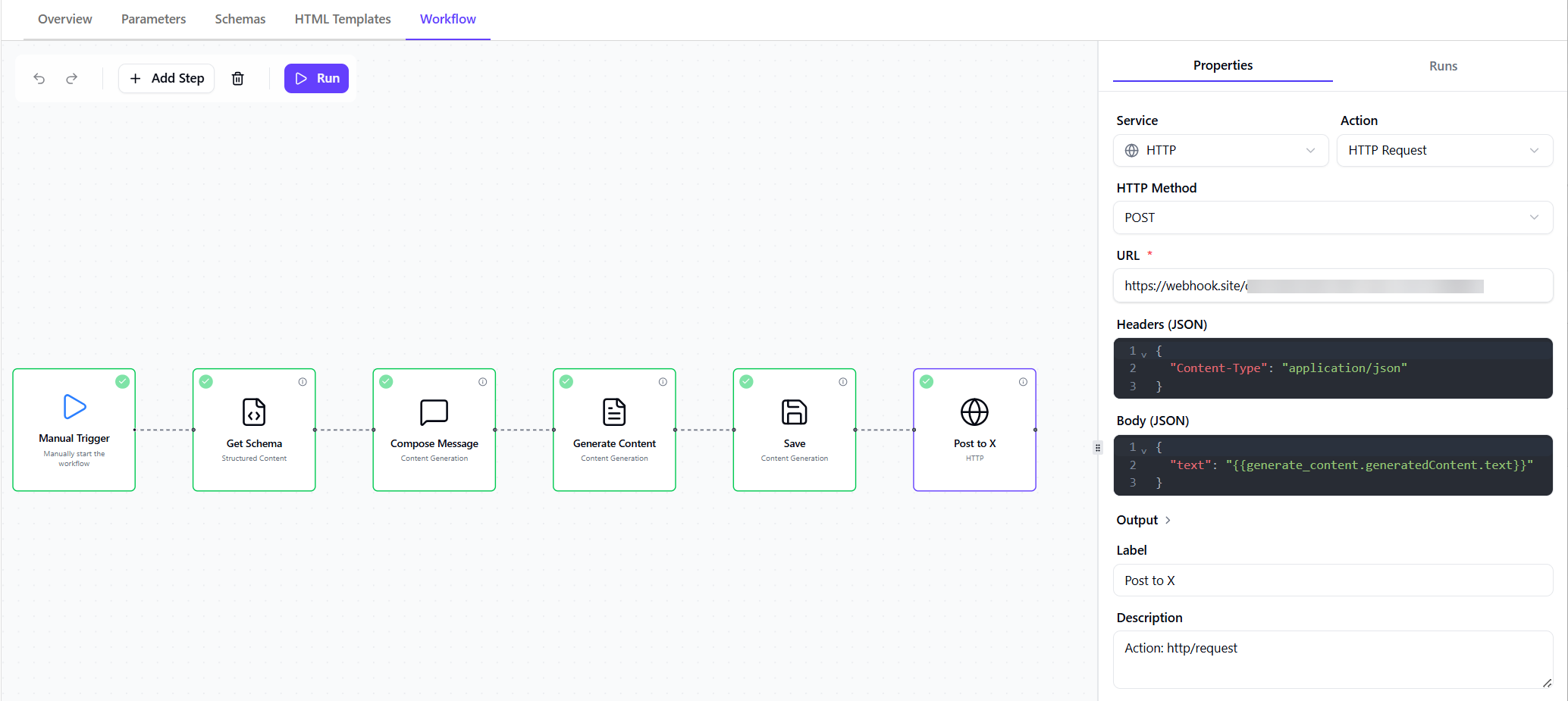
In this example, the HTTP Request action is configured with:
-
HTTP Method -
POST. The request method isPOSTbecause the workflow is sending generated content to an endpoint. -
URL - the destination endpoint where the request is sent. For example:
https://api.requex.me/hook/e159fae0-c78d-4df1-8244-7a4e264eccb7The endpoint above is only a test webhook used to verify that the workflow is sending the expected payload. In a real workflow, replace it with the endpoint for the system you want to call, such as HubSpot, X/Twitter, Slack, a middleware service, or your own API.
-
Headers (JSON) - request metadata required by the external API. For a simple test webhook, include the content type:
For APIs that require authentication, include the required authorization header, for example:
-
Body (JSON) - the payload sent to the API. This is where you pass data from previous workflow steps using workflow variables.
In the Body (JSON) editor, type @ and select the upstream action whose output you want to send. In this example, the expression references the Generate Content action.
At runtime, the workflow replaces the expression with the generated summary text. The external API receives a payload like this:
Key points
HTTP Request actions can send data from a workflow to an external system.
In this example, Generate Content creates a summary. HTTP Request sends that summary to a test webhook as a JSON payload.
The most important part is using the @ workflow syntax inside the Body (JSON) editor to reference output from an earlier step. This lets the request body include generated content from the workflow.
Keep the body as valid JSON, and place the workflow reference inside the field value.
If the external system receives the literal variable instead of the generated content, check that you selected the upstream step using the @ picker and that the referenced action runs before the HTTP Request action.
Related example
For a more detailed end-to-end example of using Generate Content, Set Variable, and HTTP Request to send generated content to an external system, see Sitecore Agentic Studio: Automating HubSpot Email Creation.