Content review
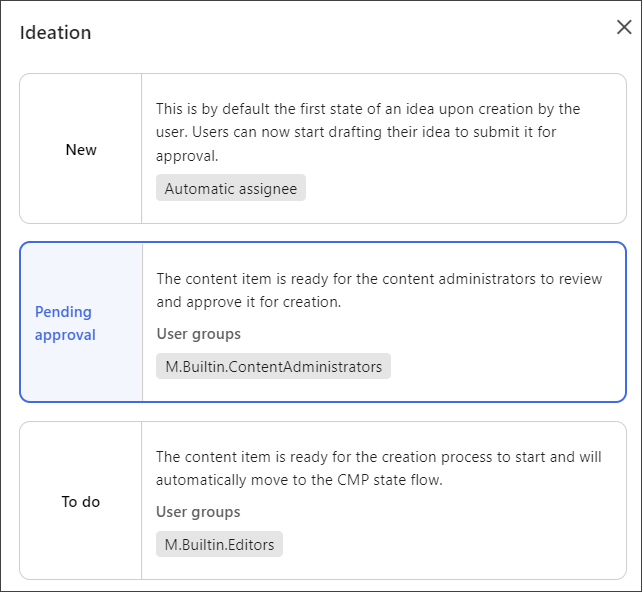
In Sitecore Content Hub, content moves through an approved workflow from the point of creation until the content is archived at the end of the content life cycle. A content item begins in the Ideation flow (as shown on the first tab) or in the CMP flow (as shown on the second tab). In the Ideation flow, there is a review in the Pending approval state. In the CMP flow, the Review state occurs, by default, in the middle of the flow and, when you click Send for review, the state of the content item changes to In Review.
When you add a new idea to Sitecore Content Hub, it begins in the Ideation flow in the New state before moving to the CMP flow. When submitted, it moves to the Pending approval state where the content administrator can review it and approve or reject it. After it is approved, the content item moves into the CMP flow and is tagged as To do. At this point, the creation process starts.
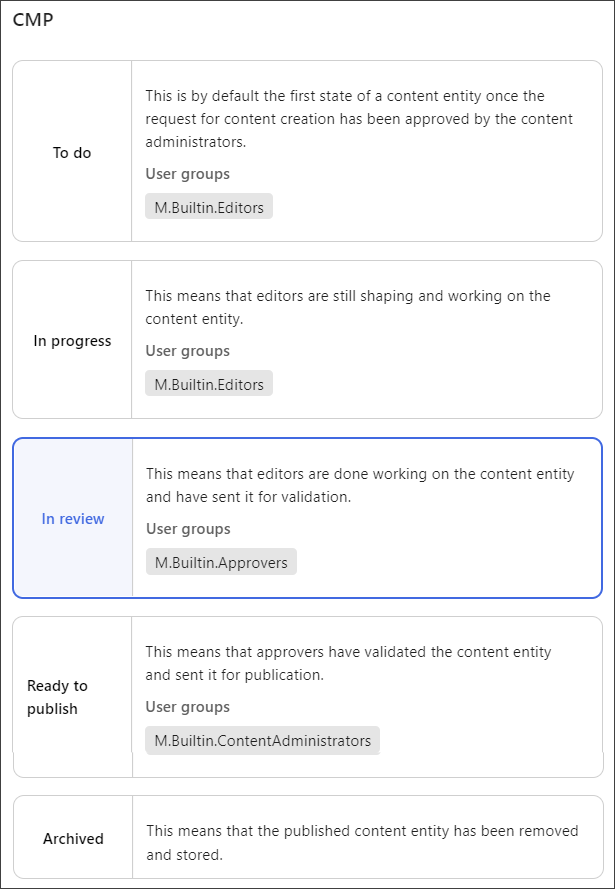
When you add a content item to Sitecore Content Hub, it begins in the To do state. Once you click Start, it moves to the In progress state where content is worked on until ready for review. Content is then sent for review and the content item is tagged as In Review. At this point, the content is validated before being ready to publish.
In Review
By default, a content item moves to the In Review state from the In progress state when you click Send for review. At this stage, the editors verify the content and approve or reject it.

Once approved, the content is ready to publish.