Import behavior
When importing packages using the Import/export functionality, the behavior of the imported elements might vary according to their type.
You can import user group policies that only include member-level security (no rules required).
Profiles
The following table shows the profile merge behavior during import.
| Exported profile | Behavior |
|---|---|
| New profile | A new profile is created. |
| Existing profile, with changes | The profile is overwritten. |
| Existing profile, with no changes | The profile remains unchanged. |
Settings
The following table shows which settings are overwritten during import.
| Setting | Overwritten |
|---|---|
| Chili | Yes |
| Composite assets | Yes |
| Drafts | Yes |
| DRM | Yes |
| Excel import/export | Yes |
| Integration | Yes |
| Portal configuration | No |
| Renditions | Yes |
| System-owned settings | No |
| Users | Yes |
Option lists
Imported option lists overwrite the existing option lists.
Taxonomies
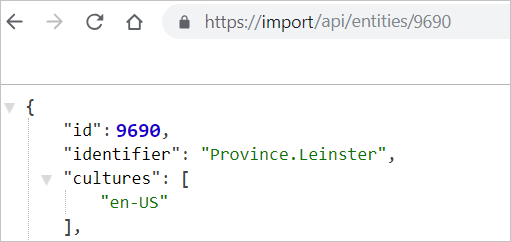
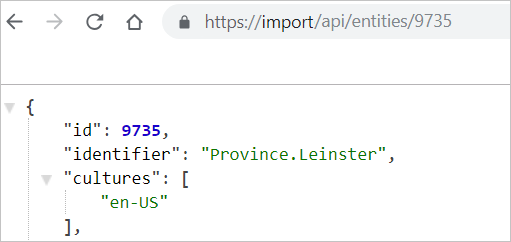
When a taxonomy is imported, its identifier in the destination instance is the same as it was in the source instance. However, the taxonomy is assigned a new id in the destination instance, different to the source id. For example, Province-Leinster has an id of 9690 in the source instance and 9735 in the destination instance.
id in source instance | id in destination instance |
|---|---|
 |  |
The following table shows the taxonomy merge behavior during import.
| Precondition | Merge behavior |
|---|---|
| The imported taxonomy does not exist in the destination instance. | A new taxonomy is created. |
| The imported taxonomy exists in the destination instance, but has different child elements. | The child elements are combined. |
| The imported taxonomy exists in the destination, but one of its child elements has differences in the number or content of its descendant elements. | The child element and its descendants are overwritten with the ones in the imported taxonomy. |