Standard user groups
The following user groups are available as standard in Content Hub. Use these standard user groups to apply common permissions that apply to most users, and only use custom groups to apply specific permissions to individual groups who need them.
Review the Security best practices to ensure standard user groups are used and configured properly.
Content Hub information architects and those in technical roles can find more detailed information about setting up user groups in the Accelerate Cookbook for Content Hub, a collection of recipes that provides information to help you successfully set up, configure, and implement Content Hub.
| User group | Focus |
|---|---|
| M.Builtin.CMP.Everyone | Tasks related to content. Users have read permissions to content pages. |
| M.Builtin.Readers | Tasks related to content. Users have read permissions to content pages, assets, and products. Readers can browse and view approved or finalized content and assets, access and manage their own drafts, and submit new ideas or content proposals. Readers cannot edit or delete assets created by others, transition approval workflows, or access administrative settings. |
| M.Builtin.Editors | Tasks related to content. Users have read, create, update, and delete permissions for content pages and assets. Editors can create, edit, and manage in-progress content and assets, update metadata and taxonomy tags, link assets, and manage their own drafts throughout the authoring lifecycle. Typically, Editors cannot perform final approvals, publish directly to production without review, or alter system taxonomy definitions |
| M.Builtin.Approvers | Tasks related to content. Users have read permissions to content pages and assets. Approvers can access review queues and mass edit features to approve, reject, or request revisions on submitted items across workflow states, as well as modify metadata during review. |
| M.Builtin.Creators | Tasks related to content. Users have read and create permissions for content pages and assets. Creators can upload files, create new draft entities, assign initial metadata and taxonomy tags, and submit created items into the approval workflow. Creators do not have access to administrative settings or the ability to edit approved assets owned by other teams. |
| M.Builtin.Guests | Tasks related to external access. Users have restricted read permissions strictly limited to shared public collections or public links, with no editing or internal search visibility. Guests cannot perform uploads, edits, deletes, and do not have state transition capabilities. |
| M.Builtin.SitecoreDAM.Everyone | Tasks related to digital asset management. Users have access to pages for the Sitecore Connect for Content Hub connector. |
| M.Builtin.Project.Everyone | Tasks related to projects. Users have basic read permissions to pages related to projects, tasks, and jobs. |
| M.Builtin.ProjectAdministrators | Tasks related to projects. Users have full edit permissions on all pages and entities under project. |
| M.Builtin.PCM.Everyone | Tasks related to the review of products and catalogs. Users have basic permissions for content management. |
| M.Builtin.DRM.Everyone | Tasks related to the review and approval of content under DRM contracts. Users have basic read permissions for DRM tasks within projects. This user group includes several built-in rules that cannot be modified. |
| M.Builtin.DRM.Administrators | Tasks related to the edit of permissions on DRM rights profiles. This user group includes several built-in rules that cannot be modified. |
| M.Builtin.CreativeCloud.Everyone | Tasks related to the use of the Sitecore Connect Creative Cloud connector. Users have access to the pages used in the connector. |
| M.Salesforce.MC.Everyone | Tasks related to the Salesforce connector. Users have access to the pages used in the connector as well as read and edit permissions. |
| M.Salesforce.MC.Editors | Tasks related to the Salesforce connector. Users have access to the pages used in the connector as well as read and edit permissions. |
| M.Builtin.Chili.Everyone | Tasks related to the use of the Sitecore Content Publisher (formerly known as the Chili publisher). Users have read and edit permissions for Chili print. |
| M.Builtin.Chili.Administrator | Tasks related to the use of the Sitecore Content Publisher (formerly known as the Chili publisher). Users have read and edit permissions for Chili print as well as additional permissions to create, update, and delete. |
| M.Builtin.SM.Everyone | Tasks related to state flows. Users have view permissions for state flows. |
| M.Builtin.SM.Administrators | Tasks related to state flows. Users have view and edit permissions for state flows. |
| Superusers | Full access rights, including access to the Manage area. |
| SC.Portal.User | Supports Cloud Portal integration by facilitating selective onboarding of Content Hub users to Cloud Portal without requiring full migration of all users. Users can navigate to Cloud Portal using navigation links that display within Content Hub. |
The M.Sitecore.Support user group is an internal user group used by the Sitecore Support team to log in for troubleshooting.
Everyone user group
The Everyone user group is a system-level user group that cannot be deleted. Every new Content Hub user is added to this group automatically when their account is created. We recommend that the Everyone user group include the minimum permissions required by any user in Content Hub, and that you create additional user groups specific to your requirements. If you change user group policies for the Everyone default user group, your changes affect all users in the system.
Do not remove users from the Everyone user group because this will remove the baseline permissions required for them to access the system. We strongly recommend that you do not modify permissions for this user group because it might cause users to lose access to features and functions. For example, do not remove the Read permission from this group.
SC.Portal.User group
The SC.Portal.User group is a special user group for Content Hub that enables selective onboarding of users to the Sitecore Cloud Portal without migrating all Content Hub users. It is intended for bulk onboarding of users, which is important when giving access to Stream features for example. Ensure Stream roles are assigned in Portal if users need advanced features.
Users must have a verified email address to be added to this group. After a user is added to this group, they see the Sitecore Cloud Portal option in the Profile and Settings menu, which redirects them to Cloud Portal. Authentication between the two systems remains separate.
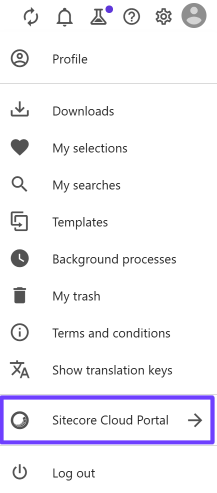
The SC.Portal.User group grants no additional Content Hub permissions and only provides basic Cloud Portal access. Only use SC.Portal.User group for legitimate user onboarding and never for integration or system accounts.
Automatically enrolling users in Cloud Portal to access Stream AI capabilities adds a Content Hub DAM tile to the Cloud Portal. Content Hub user management is not integrated with Cloud Portal identity management. Users must still be created in Content Hub and they must log in to Content Hub to use Content Hub features and functionality. Authentication and user provisioning for Content Hub remain Content Hub functions.