Customize template search
After you enable the Creation from templates option for a particular entity definition, a search page is dynamically created under Manage > Pages > Creation templates. These are highly-configurable pages that give you full control of the template functionality.
These pages are named after the related definition (for example, Product creation templates) and contain a Search component that determines how a user can search templates when creating a new entity based on a template. You can configure this Search component to fit your needs, for example, by adding facets or modifying the search output.
Example - set up template search facets for products
The following example describes how to set up template search facets for users to search templates more easily in the Creation from template dialog when creating a new product from a template. In this example, two facets are created, for product category and product status.
To set up these facets:
- On the menu bar, click Manage.
- On the Manage page, click Pages.
- On the Pages page, expand the selection for Creation templates, and then click Product creation templates.
- On the Product templates component, enable custom settings by clicking , and then click the component name.
- On the Functionality tab, turn on the Facets switch.
- On the Facets tab, under the Standard tab, click .
- In the Taxonomy item drop-down menu, click Product category (M.PCM.ProductCategory).
- Click Save.
- On the Facets tab, under the Standard tab, click again.
- This time, in the Taxonomy item drop-down menu, click Product status (M.PCM.ProductStatus).
- Click Save.
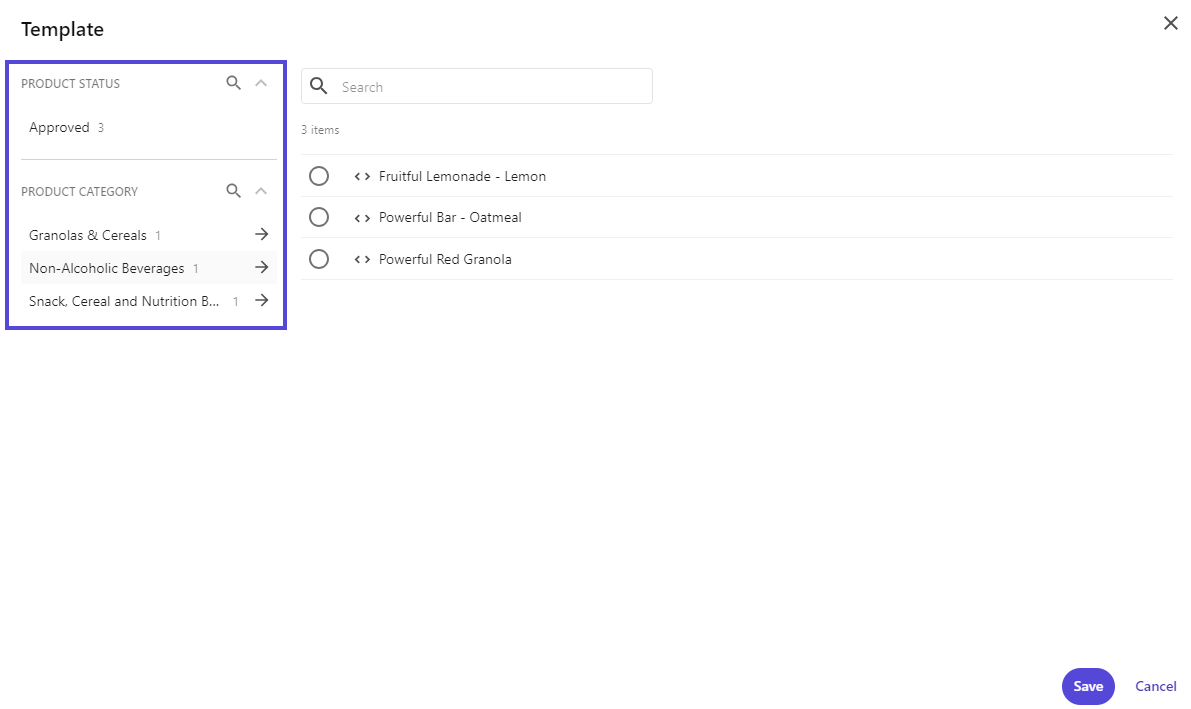
Now, if you navigate to the Products page and create a new product from a template, you can see that the Template dialog includes the search facets configured: PRODUCT STATUS and PRODUCT CATEGORY.