Enable the Creation from templates option
Before you can use templates with a particular entity type, you must enable the Creation from templates functionality for that type.
To enable Creation from templates:
-
On the menu bar, click Manage.
-
On the Manage page, click Schema.
-
On the Schema page, click the entity type for which you want to enable templates (for example, M.PCM.Product).
-
On the entity page, click Actions > Enable/Disable.
-
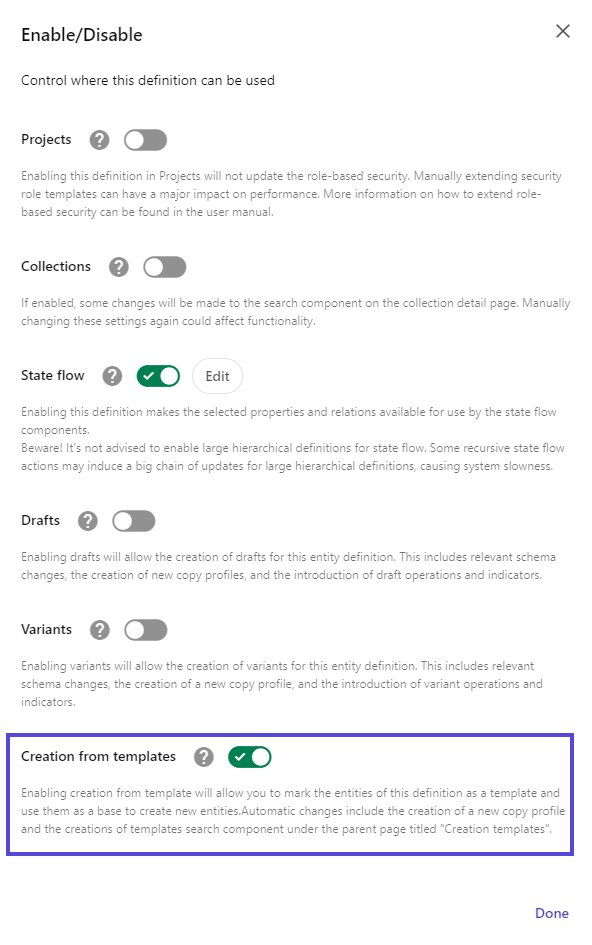
In the Enable/Disable dialog, turn on the Creation from templates switch.
-
Click Done.
Note
When you enable template creation for an entity definition, a search page is dynamically created under Manage > Pages > Creation templates. This page is named after the related definition (for example, Product creation templates) and contains a customizable Search component.
If you have suggestions for improving this article, let us know!